# E21 - Gestione Finanza

<table id="bkmrk-codice-modulo-releas" style="width: 962px; height: 59px;"><tbody><tr><td style="width: 129.031px;"><span style="font-size: 10pt; font-family: arial, helvetica, sans-serif;">Codice</span></td><td style="width: 364.484px;"><span style="font-size: 10pt; font-family: arial, helvetica, sans-serif;">Modulo</span></td><td style="width: 165.828px;"><span style="font-size: 10pt; font-family: arial, helvetica, sans-serif;">Release</span></td><td style="width: 99.6562px;"><span style="font-size: 10pt; font-family: arial, helvetica, sans-serif;">Data</span></td></tr><tr><td style="width: 129.031px;"><span style="font-size: 10pt; font-family: arial, helvetica, sans-serif;"> **E21** </span></td><td style="width: 364.484px;"><span style="font-size: 10pt; font-family: arial, helvetica, sans-serif;"> **Gestione Finanza**  </span></td><td style="width: 165.828px;"><span style="font-size: 10pt; font-family: arial, helvetica, sans-serif;"> **6.7.5.0** </span></td><td style="width: 99.6562px;"><span style="font-size: 10pt; font-family: arial, helvetica, sans-serif;">**12/02/2025**</span></td></tr></tbody></table>

<span style="background-color: transparent; font-size: 10pt; font-family: arial, helvetica, sans-serif;"> </span>

---

### INQUIRY - PARTITE SCOPERTE 

<table border="1" id="bkmrk-%7B%7Bmodl_pref%7D%7D21-2.20" style="height: 34px; width: 300px;"><tbody><tr><td><span style="font-size: 10pt; font-family: arial, helvetica, sans-serif;">E21</span></td><td><span style="font-size: 10pt; font-family: arial, helvetica, sans-serif;">2.20</span></td><td><span style="font-size: 10pt; font-family: arial, helvetica, sans-serif;">3</span></td><td><span style="font-size: 10pt; font-family: arial, helvetica, sans-serif;"> </span></td></tr></tbody></table>

<span style="font-size: 10pt; font-family: arial, helvetica, sans-serif;"> </span><span style="text-align: justify; background-color: transparent; font-size: 10pt; font-family: arial, helvetica, sans-serif;">Inserito sulla maschera di piede dell’inquiry partite scoperte, il seguente trigger.  

</span>

![003](https://gsdoc.genesyssoftware.eu/images/6750_immagini/003.png)

<span style="font-size: 10pt; font-family: arial, helvetica, sans-serif;">Se premuto con il tasto sinistro del mouse, il programma stamperà il sollecito.</span>  
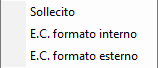
<span style="font-size: 10pt; font-family: arial, helvetica, sans-serif;"> Se viene premuto il tasto destro del mouse, verrà messa a video la seguente option list.</span>

![004](https://gsdoc.genesyssoftware.eu/images/6750_immagini/004.png)

<span style="font-size: 10pt; font-family: arial, helvetica, sans-serif;">L’utente potrà così scegliere se eseguire la stampa o inviarla via mail.</span>  
<span style="font-size: 10pt; font-family: arial, helvetica, sans-serif;"> Dopo che selezionerà una delle due voci, verranno messe a video le seguenti voci.</span>

![005](https://gsdoc.genesyssoftware.eu/images/6750_immagini/005.png)

<span style="font-size: 10pt; font-family: arial, helvetica, sans-serif;">NB: se l’utente seleziona “INVIA” il programma verificherà se sul conto inserito in precedenza sono stati inseriti i metodi di distribuzione “SOLL” e “ESCO”. Se non sono stati inseriti, le voci sopra citate non verranno mostrate.</span>  
<span style="font-size: 10pt; font-family: arial, helvetica, sans-serif;">La mail dunque verrà inviata alla mail inserita all’interno del metodo.</span>

---

### INQUIRY - PARTITARI COGE 

<table border="1" id="bkmrk-%7B%7Bmodl_pref%7D%7D21-2.20-1" style="height: 34px; width: 300px;"><tbody><tr><td><span style="font-size: 10pt; font-family: arial, helvetica, sans-serif;">E21</span></td><td><span style="font-size: 10pt; font-family: arial, helvetica, sans-serif;">2.20</span></td><td><span style="font-size: 10pt; font-family: arial, helvetica, sans-serif;">1</span></td><td><span style="font-size: 10pt; font-family: arial, helvetica, sans-serif;"> </span></td></tr></tbody></table>

<span style="font-size: 10pt; font-family: arial, helvetica, sans-serif;">Se premuto il trigger “lente d’ingrandimento”, all’interno della maschera dei partitari, sono stati inseriti i seguenti campi. (evidenziati in verde all’interno delle due immagini).</span>

![006](https://gsdoc.genesyssoftware.eu/images/6750_immagini/006.png)

![007](https://gsdoc.genesyssoftware.eu/images/6750_immagini/007.png)

<span style="background-color: transparent;"> </span><span style="background-color: transparent;"> </span>

<span id="bkmrk--8" style="font-size: 10pt; font-family: arial, helvetica, sans-serif;"> </span>