# E3105 - Gestione CE.DI. Ciclo Passivo

<table id="bkmrk-codice-modulo-releas"><tbody><tr><td>Codice</td><td>Modulo</td><td>Release</td><td>Data</td></tr><tr><td>**<span style="font-size: 10pt; font-family: arial, helvetica, sans-serif;">E</span>3105**</td><td>**Gestione CE.DI. Ciclo Passivo** </td><td>**6.7.6.0**</td><td>**26/05/2025**</td></tr></tbody></table>

---

### GESTIONE CENTRALE D'ACQUISTO - ADERENTI

<table border="1" id="bkmrk-%7B%7Bmodl_pref%7D%7D3105-%C2%A0-"><tbody><tr><td><span style="font-size: 10pt; font-family: arial, helvetica, sans-serif;">E</span>3105</td><td> </td><td> </td><td> </td><td> </td><td>  
</td></tr></tbody></table>

Accedi alla [dispensa](https://gsdoc.genesyssoftware.eu/books/l1-dispense-del-gestionale/page/l15-7-gestione-centrale-acquisti-e-aderenti-2).

###  

###  

###  

### IMMISSIONE ORDINI A FORNITORE SEMPLIFICATA

<table border="1" id="bkmrk-%7B%7Bmodl_pref%7D%7D3105-2."><tbody><tr><td><span style="font-size: 10pt; font-family: arial, helvetica, sans-serif;">E</span>3105</td><td>2.1</td><td>3</td><td>1</td><td> </td><td>  
</td></tr></tbody></table>

La funzione in oggetto è stata implementata introducendo modifiche ed integrazioni rispetto all’attuale. In particolare:

Maschera di testa:

<span style="font-family: Wingdings; mso-fareast-font-family: Wingdings; mso-bidi-font-family: Wingdings;"><span style="mso-list: Ignore;">ü<span style="font: 7.0pt 'Times New Roman';"> </span></span></span>righe venduto: oltre ad evidenziare il numero colli per ciascuno dei dodici mesi, è stato introdotto il totale progressivo sia del totale venduto sia della parte in offerta;

<span style="font-family: Wingdings; mso-fareast-font-family: Wingdings; mso-bidi-font-family: Wingdings; color: black;"><span style="mso-list: Ignore;">ü<span style="font: 7.0pt 'Times New Roman';"> </span></span></span>righe acquistato: in questo caso è stato introdotto il totale acquistato per ciascuno dei dodici mesi ed anche il progressivo dell’acquistato;

<span style="font-family: Wingdings; mso-fareast-font-family: Wingdings; mso-bidi-font-family: Wingdings; color: black;"><span style="mso-list: Ignore;">ü<span style="font: 7.0pt 'Times New Roman';"> </span></span></span>Pulsante “blocco note”, attraverso il quale è possibile consultare le note aggiuntive indicate sull’anagrafica del fornitore intestatario dell’ordine.

<span style="font-family: Wingdings; mso-fareast-font-family: Wingdings; mso-bidi-font-family: Wingdings; color: black;"><span style="mso-list: Ignore;">ü<span style="font: 7.0pt 'Times New Roman';"> </span></span></span>Accanto al codice del fornitore, anche nel caso di un fornitore convenzionato (senza divisioni per intenderci) è visualizzata l’icona ![](https://gsdoc.genesyssoftware.eu/uploads/images/gallery/2025-12/embedded-image-lvyxamtw.png)<span style="mso-spacerun: yes;"> </span>attraverso la quale, oltre ad interrogare le divisioni sono ora proposte le condizioni eventualmente indicate per applicare lo sconto carico

![](https://gsdoc.genesyssoftware.eu/uploads/images/gallery/2025-12/embedded-image-qwvpjomu.png)

Maschera di dettaglio articoli:

<span style="font-family: Wingdings; mso-fareast-font-family: Wingdings; mso-bidi-font-family: Wingdings;"><span style="mso-list: Ignore;">ü<span style="font: 7.0pt 'Times New Roman';"> </span></span></span><span style="mso-fareast-font-family: 'Arial Unicode MS';">subito dopo lo stato dell’articolo è ora evidenziato il codice articolo interno mentre il codice articolo del fornitore è proposto in coda alla riga con intestazione colonna “ArticoloForn”;</span>

<span style="font-family: Wingdings; mso-fareast-font-family: Wingdings; mso-bidi-font-family: Wingdings;"><span style="mso-list: Ignore;">ü<span style="font: 7.0pt 'Times New Roman';"> </span></span></span><span style="mso-fareast-font-family: 'Arial Unicode MS';">accanto all’icona che identifica il volantino, etichetta “V”, sono evidenziati i numeri dei volantini in essere;</span>

<span style="font-family: Wingdings; mso-fareast-font-family: Wingdings; mso-bidi-font-family: Wingdings;"><span style="mso-list: Ignore;">ü<span style="font: 7.0pt 'Times New Roman';"> </span></span></span><span style="mso-fareast-font-family: 'Arial Unicode MS';">visualizzazione data prossima consegna ordini mentre le quantità ora si riferiscono al totale delle qta da evadere (gli ordini computati partono dal numero di gg a ritroso indicati in corrispondenza del numero di “GG Copertura scorte” rispetto alla data attuale. Nel caso non indicati i GG Copertura scorte, come periodo a ritroso vengono considerati 60 gg);</span>

<span style="font-family: Wingdings; mso-fareast-font-family: Wingdings; mso-bidi-font-family: Wingdings;"><span style="mso-list: Ignore;">ü<span style="font: 7.0pt 'Times New Roman';"> </span></span></span><span style="mso-fareast-font-family: 'Arial Unicode MS';">visualizzazione della trafila articolo</span>

<span style="font-family: Wingdings; mso-fareast-font-family: Wingdings; mso-bidi-font-family: Wingdings;"><span style="mso-list: Ignore;">ü<span style="font: 7.0pt 'Times New Roman';"> </span></span></span><span style="mso-fareast-font-family: 'Arial Unicode MS';">se valorizzata con qta almeno una riga ordine, digitando exit è proposto il messaggio se l’utente è sicuro di abbandonare la funzione di inserimento; se sicuro, digitando F3 si abbandona l’inserimento e le righe non vengono confermate.</span>

<span style="mso-fareast-font-family: 'Arial Unicode MS';"> </span>

<span style="mso-fareast-font-family: 'Arial Unicode MS';">Nel caso di ODA ADERENTI</span>

<span style="font-family: Wingdings; mso-fareast-font-family: Wingdings; mso-bidi-font-family: Wingdings;"><span style="mso-list: Ignore;">ü<span style="font: 7.0pt 'Times New Roman';"> </span></span></span><span style="mso-fareast-font-family: 'Arial Unicode MS';">visualizzazione ordini solo deposito selezionato</span>

<span style="font-family: Wingdings; mso-fareast-font-family: Wingdings; mso-bidi-font-family: Wingdings;"><span style="mso-list: Ignore;">ü<span style="font: 7.0pt 'Times New Roman';"> </span></span></span><span style="mso-fareast-font-family: 'Arial Unicode MS';">proposto stato articolo aderente</span>

<span style="font-family: Wingdings; mso-fareast-font-family: Wingdings; mso-bidi-font-family: Wingdings;"><span style="mso-list: Ignore;">ü<span style="font: 7.0pt 'Times New Roman';"> </span></span></span><span style="mso-fareast-font-family: 'Arial Unicode MS';">stato "D" articolo aderente non ordinabile dalla centrale acquisti</span>

<span style="mso-fareast-font-family: 'Arial Unicode MS';"> </span>

<span style="mso-fareast-font-family: 'Arial Unicode MS';"> </span>

### GESTIONE PREMI - ANAGRAFICA PREMI

<table border="1" id="bkmrk-%7B%7Bmodl_pref%7D%7D3105-1."><tbody><tr><td><span style="font-size: 10pt; font-family: arial, helvetica, sans-serif;">E</span>3105</td><td>1.8</td><td>7</td><td>2</td><td> </td><td>  
</td></tr></tbody></table>

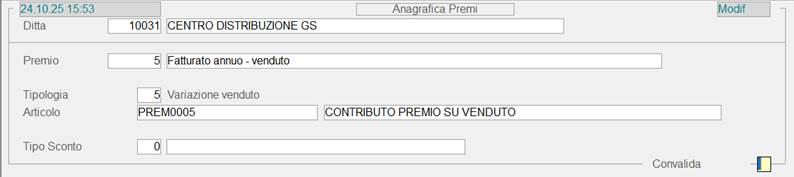
<span style="font-size: 14px; font-family: arial, helvetica, sans-serif;">Per sovvenire all’esigenza di calcolare i premi sul venduto anziché sull’acquistato, è stata introdotta una nuova tipologia, 5=Variazione venduto.</span>

Nell’anagrafica premi, pertanto, occorre creare un altro premio al quale associare il relativo articolo e quindi assegnare la tipologia 5 = Fatturato annuo – venduto.
<span style="mso-no-proof: yes;">![](https://gsdoc.genesyssoftware.eu/uploads/images/gallery/2025-12/embedded-image-l4pdbgqa.png)</span>

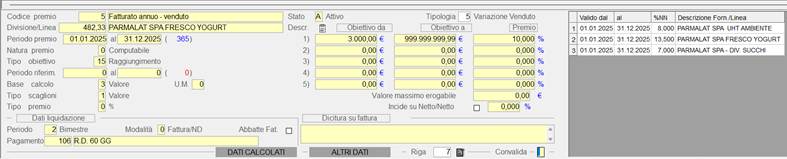
<span style="font-family: 'Arial',sans-serif; mso-fareast-font-family: Arial; mso-bidi-font-family: 'Times New Roman';">Riportiamo un esempio invece, di come può essere inserita una posta del premio che preveda il calcolo in base al venduto:</span>
<span style="font-family: 'Arial',sans-serif; mso-fareast-font-family: Arial; mso-bidi-font-family: 'Times New Roman';"> </span>

<span style="font-size: 10.0pt; font-family: 'Times New Roman',serif; mso-fareast-font-family: 'Times New Roman'; mso-ansi-language: IT; mso-fareast-language: AR-SA; mso-bidi-language: AR-SA;"><span style="font-size: 10.0pt; font-family: 'Times New Roman',serif; mso-fareast-font-family: 'Times New Roman'; mso-ansi-language: IT; mso-fareast-language: AR-SA; mso-bidi-language: AR-SA; mso-no-proof: yes;">![](https://gsdoc.genesyssoftware.eu/uploads/images/gallery/2025-12/embedded-image-yymtrl5f.png)</span></span>

### CONTRATTI PREMI - ELENCO PREMI

<table border="1" id="bkmrk-%7B%7Bmodl_pref%7D%7D3105-1.-1"><tbody><tr><td><span style="font-size: 10pt; font-family: arial, helvetica, sans-serif;">E</span>3105</td><td>1.8</td><td>7</td><td>7</td><td> </td><td>  
</td></tr></tbody></table>

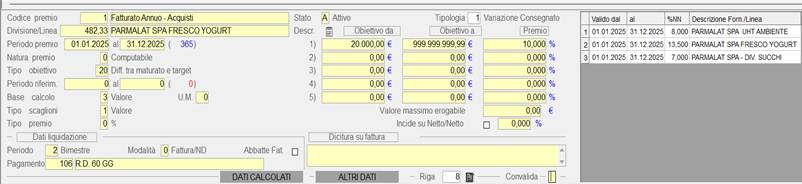
<span style="font-size: 14px; font-family: arial, helvetica, sans-serif;">Nella fase di creazione di una posta del premio invece, è stato introdotto un nuovo tipo obiettivo, precisamene il 20 = Diff. tra maturato e target. Per le poste alle quali associato questo obiettivo, il calcolo del premio avviene nel modo seguente e per aiutarci a comprenderlo, riportiamo un esempio:</span>

<span style="font-family: arial, helvetica, sans-serif;">Posta del premio:</span>

<span style="mso-no-proof: yes;">![](https://gsdoc.genesyssoftware.eu/uploads/images/gallery/2025-12/embedded-image-sybfyrr9.png)</span>

<span style="mso-fareast-font-family: 'Arial Unicode MS';">Il tipo obietto 20 = Differenza tra maturato e target, prevede che il premio matura se il fatturato supera i 20.000,00 euro ed è calcolato sulla differenza tra il valore target ed il maturato: quindi, se il fatturato del fornitore è di 280.000.00 euro il premio è calcolato su 260.000,00.  
</span>